
Exterior Rendering in the Architect’s Workflow: More Than a Pretty Picture
Ask most architects when they commission exterior renders, and the answer tends to cluster around the same project milestones: planning submission, client sign-off, marketing handover. The render is the final act proof that a design has been resolved, packaged for consumption by people who cannot read technical drawings.
That model is increasingly out of step with how visualization actually gets used on the ground. Firms running competitive practices, particularly those working across residential, mixed-use, and urban infill typologies, have quietly reorganized their visualization workflows around a different logic. Rendering is no longer something that happens after design. It happens during it.
This post looks at what that shift involves practically, where exterior visualization delivers the most value for AEC (Architecture, Engineering, and Construction) teams, and why certain project types—rooftop schemes in particular—demand a different approach to what most standard rendering briefs provide.
We’ll cover:
The Problem With Rendering at the End
What Exterior Rendering Actually Shows — and What It Doesn't
Rooftop Schemes Are a Different Brief Entirely
Keeping Visualization and Documentation in Sync
Getting More From the Briefing Process

The Problem With Rendering at the End
There’s a specific kind of design meeting that most practitioners will recognize. The project is well advanced. A render has just come back from the visualization team. Everyone is looking at it, and someone—usually the client, sometimes a senior partner—says something like: "Can we try the brick a shade lighter?" or "The entrance feels narrower than I expected."
At that point, you’re not really looking at design options. You are looking at a document of decisions that have already been made. The render reveals something that the drawings did not—and the question of whether to act on it is now tangled up with program, fee, and contractor relationships.
This is not an argument against late-stage renders — they serve a genuine communication function. But it is an argument for using visualization earlier, when the design is still genuinely in motion. A schematic-stage exterior render does not need to be photorealistic. It needs to be accurate enough to test the things that are still being decided: proportions, facade rhythm, material weight, and how the roofline reads against its neighbors. Those are visual questions, and drawings answer them poorly.
What Exterior Rendering Actually Shows—and What It Doesn't
A good 3D exterior rendering service delivers something that elevation drawings fundamentally cannot: the building as it will be experienced by someone standing in front of it. That sounds obvious, but the gap between what a measured drawing communicates and what a render communicates is wider than most clients—and some architects—appreciate until they see both side by side.
Materials are the clearest example. A specification sheet tells you the product name, the finish code, the reflectance value. A render tells you whether that particular stone reads as warm or cold on an overcast November afternoon, whether the contrast between cladding panels and window reveals is doing what you intended, and whether the texture of a facing brick is legible at street distance or disappears into a flat plane. These are not decorative questions. They affect whether planning authorities approve a scheme and whether clients are still satisfied with their decision two years after completion.

Context is the other major variable. A building rendered against a white background is a different object from the same building rendered accurately within its site, with the correct neighboring rooflines, street widths, tree canopy, and ambient light for that latitude and orientation. The first version is useful for product photography. The second is useful for design. Teams that brief visualization without accurate site data are, in effect, asking for the first version and expecting the second.
What exterior rendering does not do well is substitute for technical documentation. Renders should not be driving dimensions, resolving construction junctions, or standing in for coordinated drawing packages. Their value is visual communication—held in that lane, they are genuinely powerful. Stretched beyond it, they create coordination problems.
Rooftop Schemes Are a Different Brief Entirely
Rooftop additions and terrace extensions occupy an awkward middle ground in visualization terms. The standard exterior render—a three-quarter view from street level, showing the full building face — misses the point of the design entirely. No one experiences a rooftop terrace from the street. They experience it from inside it.
Effective terrace home renders are built around eye-level viewpoints from within the terrace space itself — showing how a pergola or screen element frames the skyline, how planting and paving read at human scale, how the transition between interior and exterior feels when the glazed doors are open. For residential clients especially, this is the view that sells or kills a scheme in a presentation meeting. A plan of a rooftop layout, however carefully drawn, simply does not convey what it will feel like to stand up there.
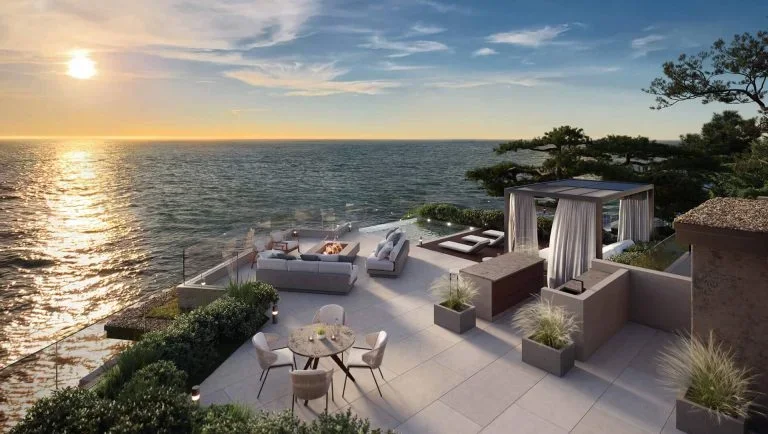
Planning submissions for rooftop additions present a separate set of requirements. Local authorities typically want verified views demonstrating the impact of the proposed addition on the existing building character and on the wider streetscape — images produced from fixed, surveyed viewpoints with documented camera settings. This is a technically different product from a design-intent render, and conflating the two creates problems. A visualization that works beautifully for a client presentation may not meet the evidential standards required for a planning officer's assessment, and vice versa.
Keeping Visualization & Documentation in Sync
One issue that comes up repeatedly in practices that use visualization actively throughout design development is model divergence. The architectural model — the one feeding the drawing set — evolves continuously. The visualization model, if it is maintained separately, tends to lag. By the time a render is produced, it may be reflecting a version of the design that has already moved on in small but meaningful ways: a parapet height adjusted, a window revised, a material substituted.
The firms that manage this most effectively treat the architectural model as the single source of geometry for both documentation and visualization. Changes propagate once, into one model, and visualization outputs at each milestone reflect the actual current design. This is not always straightforward to set up—it requires clear agreements with visualization suppliers about file formats, update frequencies, and handover protocols—but it eliminates a category of error that otherwise surfaces at the worst possible time.
The parallel with technical documentation practice is worth noting. As CADdetails has covered in the context of architectural CAD drafting, accurate drawing documentation compounds in value across a project—errors introduced early are amplified by everything built on top of them. The same logic applies to 3D geometry. A visualization model that accurately reflects the design from the schematic stage onward produces better outputs at every subsequent milestone, rather than requiring a rebuild each time the render scope escalates.
Getting More From the Briefing Process
Visualization quality scales directly with brief quality. This is not a comfortable thing to say to a profession that often treats the render brief as a five-minute email, but the evidence for it is consistent: teams that invest time in specifying viewpoints, confirming materials, providing accurate site data, and clarifying the purpose of each image get renders that are genuinely useful. Teams that send a Revit file and ask for "a nice exterior" get something that looks professional but may not serve the actual design decision at hand.
Viewpoint selection, in particular, is underestimated. The viewpoint determines what a render communicates. A view chosen to show facade composition tells a different story from a view chosen to show the building's relationship to the street, or the transition from public realm to entrance. For rooftop schemes, as noted above, the choice of viewpoint is essentially the brief—get it wrong and the render answers a question no one was asking.
The broader point is that exterior rendering, used well, is a design communication tool that reduces misalignment between teams, between designers and clients, and between submitted schemes and approved outcomes. Used as an afterthought, it is an expensive way to produce images that confirm decisions already made. The difference between those two outcomes is mostly determined before the first render request is sent.
Looking for products for your next project? Find the right fit on CADdetails.
Author: Julia Shitina is an SEO Manager at a professional CGI studio specializing in architectural visualization, 3D product rendering, and digital content for architects, developers, interior designers, and furniture brands worldwide.
Cover image by Tile Merchant Ireland on Unsplash